2a. Apply label to leads from the app as an agent
i. On the lead details page, tap on Add label to apply a label to a lead.
ii. Select the label that you want to apply and tap on Add Label.

iii. Label is now successfully applied to the lead.
2b. Remove the label from the lead as an agent from the app
i. On the same screen as before, deselect the label or tap on None. Once done, tap on Add.
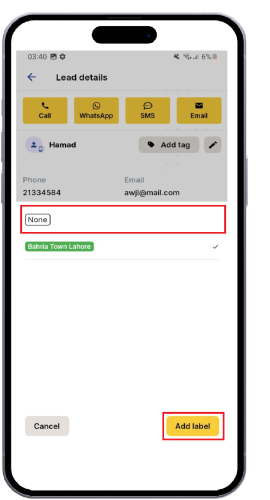
ii. label has now successfully been removed from the lead.
If you have more questions regarding the tags and how to best utilize them, contact our support team by clicking the chatbot on the bottom right.Was this article helpful?
That’s Great!
Thank you for your feedback
Sorry! We couldn't be helpful
Thank you for your feedback
Feedback sent
We appreciate your effort and will try to fix the article